Shared inbox for WhatsApp

Stop asking,“Who’s replying?”

WATeamInbox puts the WhatsApp conversations your team handles in one inbox. See who owns each conversation, leave notes for handoffs, and pick up where a teammate left off.

For support, sales, and operations teams that share a WhatsApp number.

Want to host it yourself? The full application is MIT-licensed, with setup and production guides in the public repository.

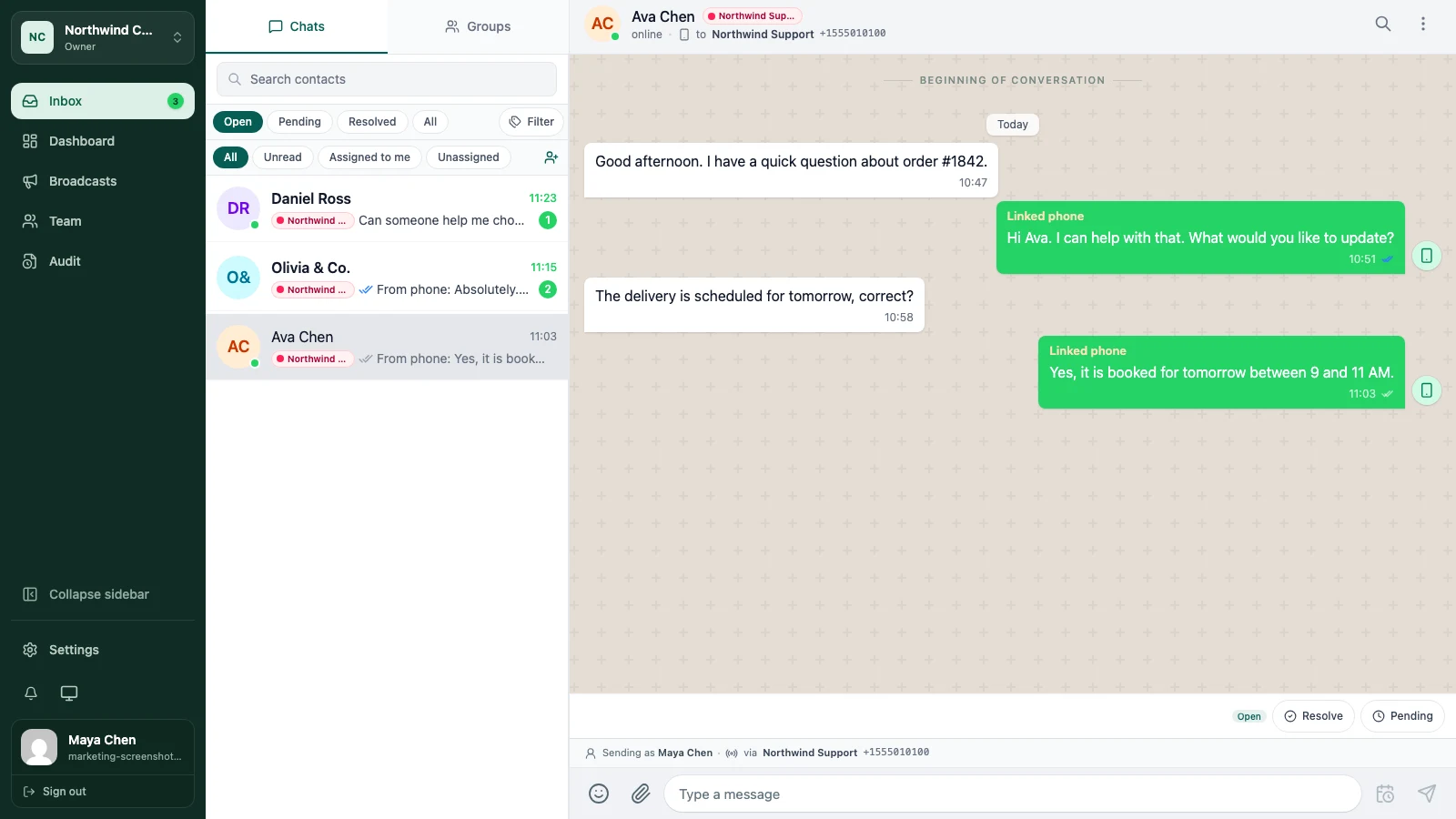
The real WATeamInbox application showing a shared team inbox with synthetic demo conversations
The WATeamInbox inbox, shown with demo conversations.

Every conversation has an owner.

One shared inboxAssignments and notesCloud or self-hosted

Cloud or self-hosted

Use it without running servers. Or run it yourself.

Cloud is the quickest way to start. The same team inbox is also open source, so you can deploy it on infrastructure you control.

01

Open source · MIT licensed

Self-host WATeamInbox

Download the code, deploy the stack, and keep the application and its data on infrastructure you operate.

  • MIT-licensed application code
  • Docker-based deployment guide
  • Your team handles updates and backups
Read the repository
02

Managed service · Available now

WATeamInbox Cloud

Create a workspace, connect WhatsApp, and invite your team. We run the application and ship the updates.

  • No server setup
  • Monthly plans from $39
  • Public code and self-hosting docs
Create a Cloud account

Day-to-day work

What changes when
the inbox is shared.

01

Read the thread before you answer

See the messages, contact details, and earlier replies in one place—even when another teammate handled the customer yesterday.

02

Assign the conversation

Put a teammate’s name on it. Everyone can see who is handling the reply, so customers do not get two answers—or none.

03

Leave a note for the next person

Add the detail that does not belong in the customer chat: what is pending, what was approved, or who needs to follow up.

Set up Cloud

Your team can be in the inbox today.

Create a workspace, scan a QR code to connect WhatsApp, and invite the teammates who answer customers with you.

Open WATeamInbox Cloud
  1. 01
    Create your workspace

    Register, verify your email, and name the workspace your team will use.

  2. 02
    Connect WhatsApp

    Pair a device with a QR code and bring the conversation history into view.

  3. 03
    Invite the team

    Give each person a role, then start assigning conversations.

Common questions

Before you connect your number.

What is WATeamInbox?

WATeamInbox is a web inbox for teams that answer customers on WhatsApp together. Each teammate has their own account, while the team shares conversation history, assignments, and notes.

Who is it for?

Teams where two or more people answer the same WhatsApp number. It is useful when you need to know who is replying, hand a customer to someone else, or cover a teammate’s shift.

Is WATeamInbox open source?

Yes. The application is published under the MIT License. You can inspect the code, deploy it yourself, and use the self-hosting docs without a Cloud subscription.

How do I start with WATeamInbox Cloud?

Create an account at app.wateaminbox.com, verify your email, and create a workspace. You can then connect a WhatsApp device and invite teammates. See Cloud pricingfor plan limits and monthly costs.

Can I run it myself now?

Yes. Start with the repository and the self-hosted deployment guide. As with any beta software, review the infrastructure, data handling, backups, and WhatsApp account risks before production use. Practical write-ups also live on the WATeamInbox blog.

Is this an official WhatsApp product?

No. WATeamInbox is an independent project and is not affiliated with, endorsed by, or sponsored by WhatsApp or Meta.
No more “I thought you had it”

Give every customer
reply an owner.

Create a Cloud account View plans Host it yourself Read the guides Read the blog
Questions? Message usWhatsApp · +65 8404 2683